Showing posts with label Review. Show all posts

February 28, 2009

Google Chrome Backup

Chrome logoGoogle Chrome Backup is a nice backup tool to create backups of your Google Chrome profiles. Google Chrome Backup can backup, create, restore and delete Google Chrome profiles. A profile contains all the personal information of a user like bookmarks, the browsing history and the layout of the browser.
You also can create another profile(s) for your Chrome browser. Means that it would not become a problem if you are sharing your Chrome with your family or friends.

Another features for this backup utility:

-Backup and Restore Wizard
-Chrome and Chromium support
-Select a profile
-Backup and restore profile
-Create and delete profile
-Add existing profiles to Google Chrome backup
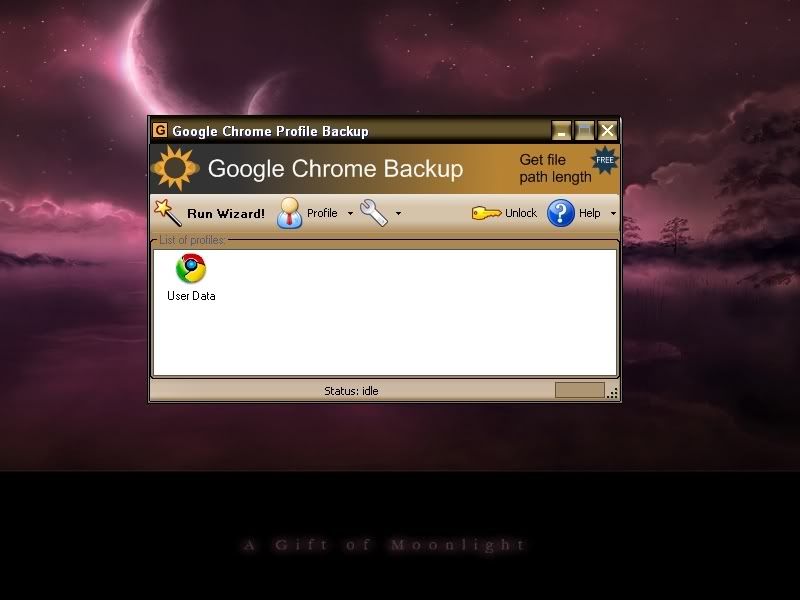

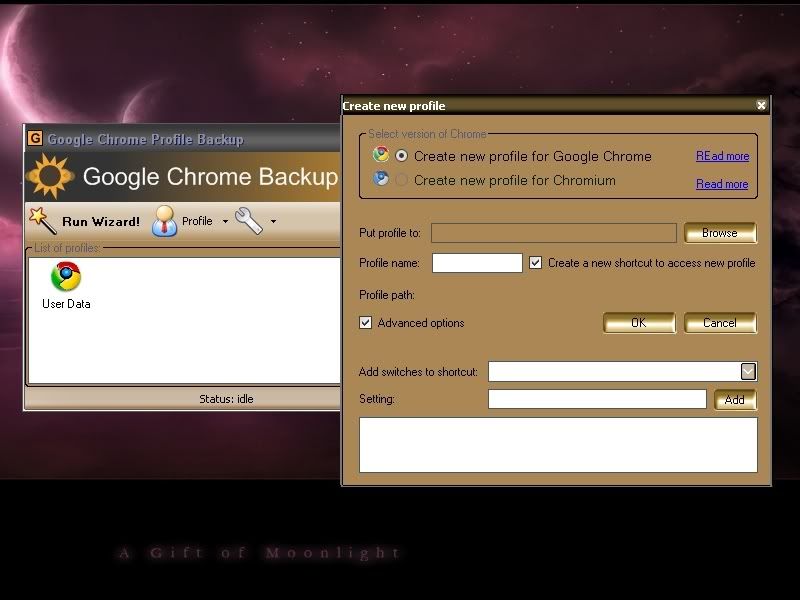
GCB
^Interface^

GCB 1
^Creating new profile^

GCB 2
^Some of the options^


Download: Click Here

February 22, 2009

Rip Movies with Your Free DVD Ripper

This is one of the software to rip and convert movies into another format.
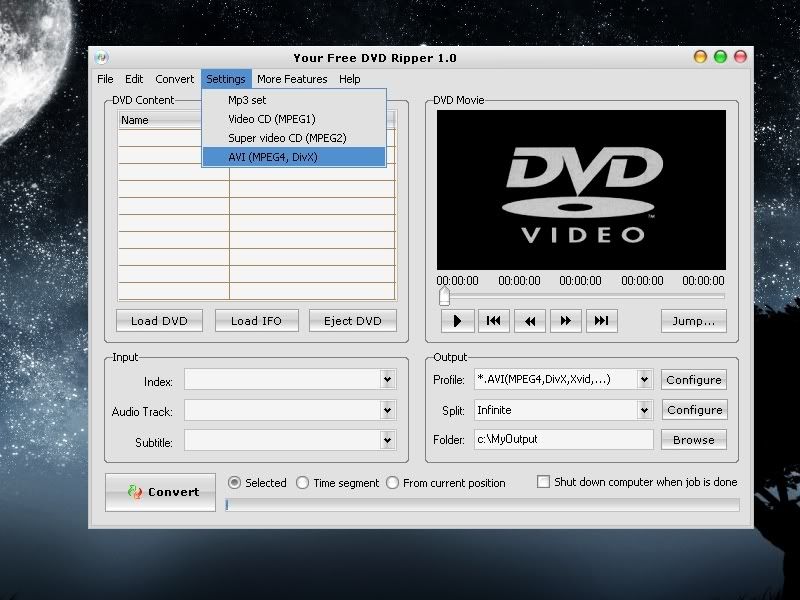
Your Free DVD Ripper provides you a simple way to convert DVD movies to VCD/SVCD (MPEG1, MPEG2), AVI (DivX, MPEG4, xDiv etc.), MP3, WAV formats. The software detects your CPU type and selects the most effective algorithm. You can convert a specific time segment or chapter of DVD if you do not need to convert the whole movie. The flexible options allow to enjoy the excellent resulting quality.

Main Features:
-Rip DVD to multi formats - include VCD(MPEG-1 format), SVCD (MPEG-2 format), DivX and other standard AVI compression codecs. Plus audio formats: MP3 and WAV!
-Playback while ripping - You can know which part of the DVD movie is being ripped since it plays back while ripping.
-Support Different DVD Types - Support both NTSC and PAL.
-Optimized for your type of CPU.
-Specify different output format for each task.
-Converts entire movie.
-Converts each chapter to an individual file.
-Convert any part of a chapter or movie.
-Remove unwanted subtitles and audio tracks.
-Excellent Quality - Achieve smaller files without any loss of quality.

dvd ripper

January 24, 2009

FileHippo Update Checker : Keep Your Softwares Updated!

You have lots of softwares installed on your PC. But most of them are an old installation. But how can you identify there's some updates for your software? Lazy to go online and check every updates available via their website?
Well, this tiny software will and can help you so much!

The Update Checker will scan your computer for installed software, check the versions and then send this information to FileHippo.com to see if there are any newer releases. These are then neatly displayed in your browser for you to download.

This software still in Beta testing mode and its FREE to use!

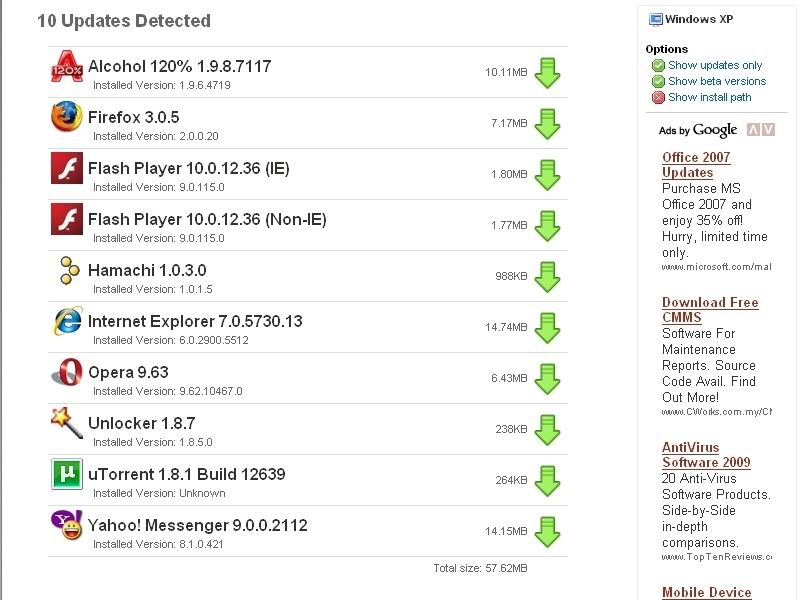
filehippo updater


See the list above? I'm currently out of date on 10 softwares installed!!

By clicking on the green arrow right of the application will let you to directly download the installable exe file to update your softwares.

Privacy Policy
The Update Checker will not send any personal information back to FileHippo.com. The only information collected is a list of programs and their versions, along with the operating system details to help with processing. Additionally none of this is linked to your IP address and the logs are deleted after processing.


Download : FileHippo Update Checker

January 9, 2009

8start - A Cool, Free Application Launcher

Sorry if you keep waiting for my new entry. A bit busy now with the lecture hours and assignments. Plus with my shitty Internet connection! angry Let me pay it!

Want a clean, smart-looking dekstop? Feels your desktop in a messy conditions with so many shortcut on it? Too many shortcuts until you can't see your beautiful wallpaper behind it?
Now you can have a beautiful desktop with this free application launcher!

8start Launcher is the most convenient and advanced way to launch your start menu.
This exclusive startup and applications launching utility will change the way you use your desktop. It becomes easier in identifying programs from the displayed groups and icons. It makes your wallpaper visible clearer, cleaner desktop with menus accessible with a single click.

Some of Launcher's Features:
- Organize shortcuts into groups and categories
- Accessed by system tray, hotkey and middle mouse
- Launch applications and files fast and intuitive
- Keeps the desktop clean, no more shortcuts block the view of your wallpaper
- Portable with relative path defined supported, can be run in flash drive or install in harddisk.
- Show program name / description when mouse over the icon
- Quick access to the drive content by click the drive letter
- Changable skin with transpancy png format supported, 30+ beautiful skins available for download
- Launcher auto shrink to fit number of icons
- Whole new concept of launching your applications and files

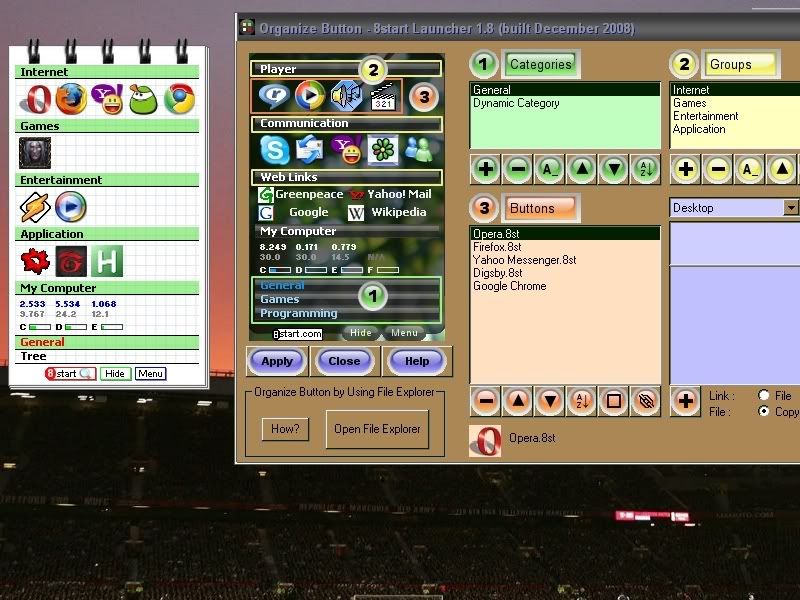
8start 5
My finalised setting of 8start Launcher!

Presssing Ctrl+Shift+A will bring up the 8start windows where your mouse pointer is.
Anyway, that's my combination keys. You still can change it the way you like.

8start 4
Click at the Menu button to organize dan setting your 8start.


Have a wonderful days! smiling...

December 21, 2008

Tools To Recover Deleted Files

If you have deleted some files from your hard drive, don't be panic! As long as you use the right unerase software, your deleted files can be recovered very easily. Chance of success is more or less guaranteed if you act as soon as you realize that the files are missing.

Tools that can help you undelete files are not provided as standard in any operating system. So you will need to use undelete software.

The list below are some of the recommended data recovery software.


Recover My Files

  •  Recover deleted files even if emptied from the Recycle Bin
  • Recover formatted hard drives, even if you have reinstalled Windows!
  • Recover your files after a hard disk crash
  • Get back files after a partitioning error
  • Recover documents, photos, video music & email.
  • Recover from hard drive, camera card, USB, Zip, floppy disk or other removable media
  • Free to try, need to buy for full version

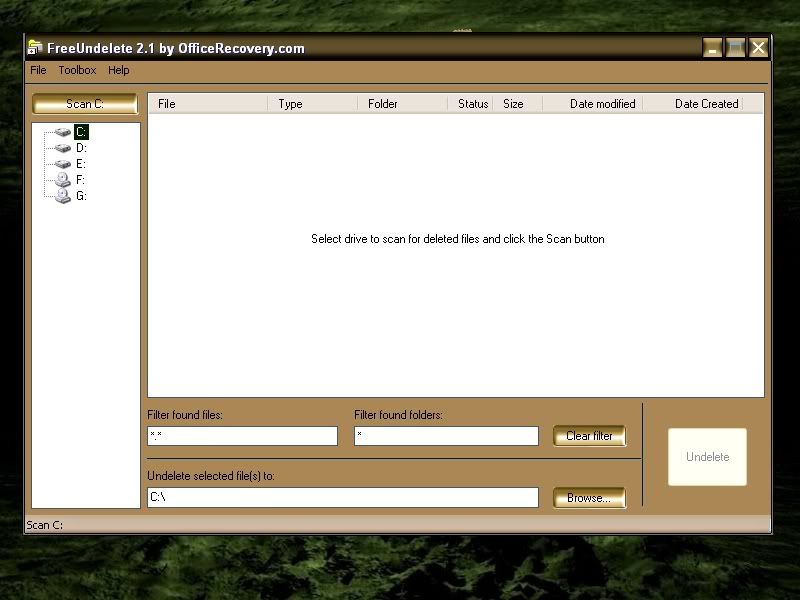
FreeUndelete

  • File systems supported: NTFS 1.0, NTFS 2.0, FAT32, FAT16
  • Operating systems supported: Windows XP, 2000, NT 4 (SP2 or higher required), Windows 2003 Server
  • Easy to use, no special user skills required
  • Full install/uninstall support
  • It's FREE!

File Recover

  • Recovers files instantly from hard drives, floppy drives and other types of fixed media.
  • Rapid scan engine - a typical hard drive can be scanned for recoverable files within minutes.
  • Scan all files and directories on selected hard drives.
  • Search for a recoverable file using part or all of its file name.
  • Utilizing a non-destructive, read-only file recovery approach. File Recover will not write or make changes to the section of the drive from which it is recovering data.
  • Batch file recovery (recovers multiple files in one action).
  • Works around bad-sector disk areas. Recovers data where other programs fail.
  • Supports standard IDE/ATA/SCSI hard drives, including drives larger than 8 GB.
  • Supports hard drives formatted with Windows® FAT16, FAT32 and NTFS file systems.

Handy Recovery

  • NTFS/NTFS 5 + EFS, FAT 12/16/32, HFS/HFS+ file systems support
  • In-depth disk scanning for certain file types
  • Option to create disk images for deferred recovery
  • Preview window to show the content of deleted files
  • Shows probability of successful recovery for each file
  • Recovers files from deleted and formatted partitions
  • File filtering by name, mask, date and size
  • Restores the structure of deleted folders
  • One-click filter button to show only the deleted files
  • Only have 30-day trial period. After that, need to register.

recover my files

Recover My FIles

free undelete

Free Undelete


December 19, 2008

Disby - Free IM+Email+Social Networking Applications.

Digsby is a multiprotocol IM client that lets you chat with all your friends on AIM, MSN, Yahoo, ICQ, Google Talk, and Jabber with one simple to manage buddy list. So, we can say that Digsby is "IM+Email+Social Networking" applications.


Digsby's Features

Instant Messaging

  • One combined buddy list for all your AIM, MSN, Yahoo, ICQ, Google Talk, Jabber, and Facebook Chat Accounts.
  • You can manage multiple conversations with tabbed conversation windows. You also can drag tabs out into their own windows for important conversations.

Email

  • Manage your Hotmail, Gmail, Yahoo Mail, AOL/AIM Mail, IMAP, and POP accounts right from Digsby.
  • You will get popup notifications when new email arrives. Clicking a popup takes you right to the message with auto-login into webmail accounts.
  • You also can perform actions such as "Mark as Read". ""Delete" or "Report Spam" right from the email InfoBox.

Social Networking

Digsby allows you to add social networking sites to the application:

  • MySpace: updates to your friends' profiles, status, and private messages. Provides instant access to various parts of your MySpace account, such as your profile, home page, blog, etc.
  • Facebook: updates in your friend feeds. Digsby now works with both the new and old styles of Facebook.
  • Twitter: allowing you to easily submit new "tweets", and view your friends' tweets.
  • LinkedIn: various updates from your friends

digsby 1

You can add and manage your email accounts, social networking 

digsby 2

  • Top Left: Customize you chat windows. Choose which themes you like.
  • Bottom Left : It's a notification when your buddy goes online or offline. You can change it at the Notification tabs
  • Middle : It's a Myspace status update. You can see your friends's latest update from here.

Digsby for me is really convenient. Furthermore, you can go to www.digsbies.org and submit a feature request and then other users can vote on it so the developers know which to implement first.

Have a try on this application 1st and I'm sure you'll agree with me! 

Have a nice day with Digsby! :D

Digsby Homepage


December 12, 2008

6 alternative browsers

Internet Explorer, Firefox* and Safari lead the market, but there are other browsers out there for PC and Mac users. Which are better from these 'lesser-known' browsers?

ComputerWorld has come out with an excellent article which puts these 'lesser-known' browsers out for a spin and see how they do. The browsers compared were :

Short introduction to those browser.

  • Camino - An open-source browser based on Mozilla's Gecko rendering engine, is clearly designed to be a simple, easy-to-use, yet fully functional browser. With a look and feel very similar to Safari and Firefox, almost anyone will find it easy to work with in seconds.
  • Maxthon - If you're looking for a browser that bristles with power features, and don't mind a somewhat unattractive interface and some confusing configuration, then Maxthon is the browser for you. It's got just about every feature built into competing browsers. Power users will love it. Those who like sleek design will turn away.
  • OmniWeb - OmniWeb has been around longer than Mac OS X, dating back to the NeXT platform of the 1990s. OmniWeb has always been an excellent citizen of technologies specific to the NeXT -- and later, OS X -- platform, and the polish shows through in even minor details.
  • Opera - Opera is a Windows-based browser that has been ported to many different platforms, including most Unix variants such as Mac OS X and Linux/FreeBSD/Solaris; cell phone operating systems, including Windows Mobile, PalmOS, BlackBerry OS. But despite its ubiquitous nature, Opera has so far only captured 2% of the browser market.
  • Shiira - Shiira is a relatively new entrant to the Mac Web browser market. Like Apple's Safari and Google's Chrome, Shiira is based on WebKit.

Further Reading : Neowin, ComputerWorld

Short Notes
* = My previous default browser

** = Current default browser! It's the best! Try it!

December 4, 2008

How To Delete a Locked File

Try to delete unwanted file(s), but an error message suddenly pop-up saying that file(s) is currently in used, shared or opened?

Have any problem ejecting USB Mass Storage Device? Like this?

So, Unlocker is the best solution! 

This utility is the solution to the following types of Windows error messages :

  1. Cannot delete folder: It is being used by another person or program 
  2. Cannot delete file: Access is denied 
  3. There has been a sharing violation. 
  4. The source or destination file may be in use. 
  5. The file is in use by another program or user.
  6. Make sure the disk is not full or write-protected and that the file is not currently in use 

Download this free,small utility here and install it. 

If any of the error messages appeared, simply right click at the folder or file and select Unlocker.

Example : 


This screen will appear when you click Unlocker and will show what process using the file u want to delete. Choose"Unlock All" and you now can delete that file like normal.

Download Unlocker

Altenative links 1

Alterbative link 2